"The text is correct" is a claim — and a claim you have to be able to back. The way you back it is by comparing your text, line by line, against an authoritative edition. This article is about doing that comparison well, including the awkward case where the authority exists only on paper.
New here? This is one article in a Gurugo Labs field series drawn from a client engagement to produce a traditional trilingual (Sanskrit · Tamil · English) devotional book — but it reads on its own. This article: how to verify a text against a trusted printed edition, and how to turn a scanned book into text you can actually compare against. One term you'll need: OCR (Optical Character Recognition) is software that reads the letters in a picture of a page and turns them back into editable text.
Correct against what?
Every earlier article has quietly assumed a standard of "correct." This one makes it explicit. You cannot verify a text against your own memory or intuition — that is exactly how confident errors creep in. You verify it against an authority: a printed edition trusted by the tradition, or a teacher's own copy. The whole task here is a disciplined comparison between your text and that one.
The friction is practical. Your text is digital — searchable, comparable. The authority is very often a physical book, perhaps an old one. You can compare them by eye, page against screen, and for a short text that's fine. But eyes tire, and over hundreds of lines of small marks they miss things. It is far more reliable to get the reference into digital text too, so the two can be compared systematically. That is what OCR is for.
What OCR does, and why it struggles here
OCR looks at a picture of a page and works out which letters the shapes represent, producing text you can search and compare. On a clean printed English page it is nearly flawless. On an old Devanagari or Tamil page it has to work much harder, for three reasons.
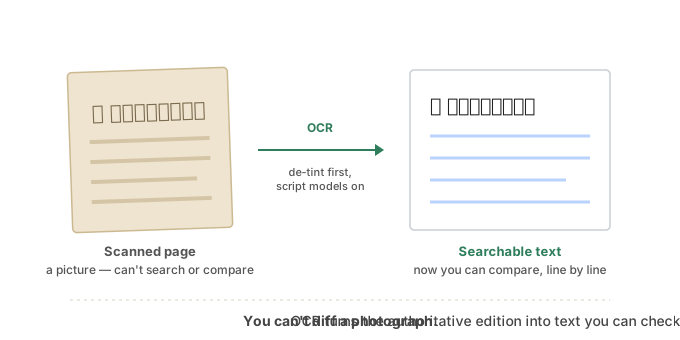
It needs to know the script. General OCR expects the Latin alphabet. To read Devanagari or Tamil it must use a model trained for that specific script — and for a mixed book, more than one at once. Point plain OCR at a Sanskrit page and you get nonsense.
Old scans are dirty. A scan of an aged book carries a sepia tint, uneven lighting, show-through from the other side of the page, and slight skew. All of that confuses the letter-recognition. A preprocessing step — converting to grey, boosting contrast, then reducing the image to clean black-on-white — dramatically improves what OCR can read.
The small marks are the first to break. The pitch accents and fine vowel marks are exactly what OCR is least reliable about — the same marks that matter most. So OCR output must never be treated as truth.
The mental model that keeps you honest
Here is the key idea: OCR of the reference is not the authority. It is a tool for finding where to look.
You are not trusting the OCR text. You are using it to align your text against the reference and surface the differences — the places where your version and the scanned edition don't match. Each difference is then a question, not a verdict: why do these differ here? Sometimes it's an error in your text (fix it). Sometimes it's an OCR misread of a perfectly good reference (ignore it). Sometimes it's a genuine difference between editions — a variant reading — and that is precisely the kind of thing to take to a scholar.
Used this way, even imperfect OCR is enormously valuable: it turns "I believe the whole text is right" into "the text matches the reference everywhere except these specific points, each of which I have looked at and resolved."
How we solved it on the engagement
The client's authoritative reference existed only as an aged, sepia-tinted printed book, so we brought it into the comparison by scanning and OCR-ing it. The preprocessing did most of the work: each page was converted to greyscale, contrast-boosted, and binarized to clean black-on-white before recognition, which lifted the accuracy on the tinted scans enormously. We then ran OCR with Devanagari and Tamil script models together, not general OCR, so a mixed page was read in the scripts it was actually written in.
Crucially, we never treated that OCR text as truth — it was too unreliable on exactly the accents that mattered. Instead we used it to align our text against the reference and surface every divergence, then walked each one: our error, an OCR artefact, or a genuine variant reading. The variants and every accent question went to the Sanskrit scholar for adjudication. That is how several open questions on the engagement — which of two readings was authoritative, whether a particular passage was read one way or another in the tradition — were settled against the source rather than by guesswork. The machine narrowed the search to a handful of points; the scholar closed them.
⚙️ For the hands-on reader
- Install OCR with script-specific models (Devanagari, Tamil) and run them together for a mixed page; general/Latin OCR will fail.
- Preprocess every scanned image first: greyscale → boost contrast → binarize (a threshold that makes it clean black-on-white) → deskew. This single step is often the difference between usable and useless output.
- Treat OCR text as a comparison aid, never as a correct source. Align by verse or line so differences are easy to read.
- Expect the accents and small marks to be the least accurate part; verify those by eye rather than trusting the OCR.
The limit, again
As with proofreading, the accents deserve special caution, because they are the least reliable thing in an OCR pass and the most important thing in the text. Use the comparison to locate where accents might differ, but confirm the accents themselves by careful eye and, where it matters, by a knowledgeable reader. The machine narrows the search; a human closes it.
Takeaways
- "Correct" only means something relative to an authority — a trusted printed edition or a teacher's copy, never memory.
- To compare systematically, get the reference into text too — that's what OCR is for.
- Indic OCR needs script-specific models and image preprocessing (de-tint, contrast, binarize) to work on old scans.
- OCR output is a tool for finding differences, not a source of truth — each difference is a question to investigate.
- The accents are the least reliable part of OCR and the most important part of the text — confirm them by eye and with an authority.