You open your new layout software, paste in perfect Unicode Sanskrit, and… boxes. Or letters that refuse to join. The font problem you thought you'd left behind has followed you into the layout stage wearing a slightly different mask. Here is why, and how to set fonts up so every script renders correctly.
New here? This is one article in a Gurugo Labs field series drawn from a client engagement to produce a traditional trilingual (Sanskrit · Tamil · English) devotional book — but it reads on its own. This article: why Devanagari and Tamil can still render wrong inside professional layout software, and the font settings that fix it. Two terms you'll need: tofu is the empty box (☐) a program shows when the font has no drawing for a character; shaping is the software step that joins and reorders a script's letters into their correct forms.
Correct text is necessary, not sufficient
By now the text is flawless Unicode — every character is truly the character it means. It's tempting to assume correct text will display correctly anywhere. It won't, on its own. Displaying an Indian script correctly needs two separate things to be true at the same time, and the layout stage is where you finally have to get both right.
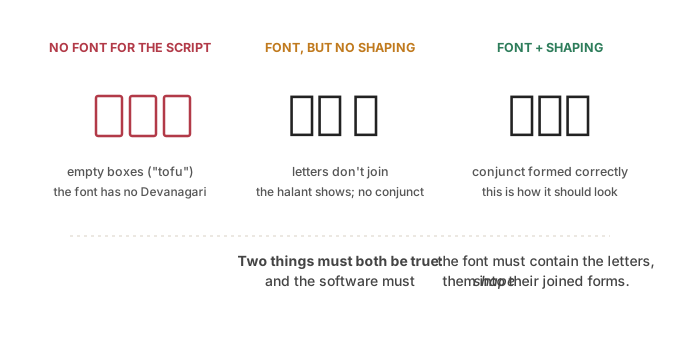
The picture shows the two failures and the success. Understand these three states and every font problem becomes diagnosable at a glance.
Requirement one: a font that actually contains the script
A font is a set of drawings, and no font draws everything. Many perfectly good fonts — including most default body fonts — contain the Latin alphabet and nothing for Devanagari or Tamil. Apply such a font to your Sanskrit and the program has no drawing to show, so it shows tofu: empty boxes, one per missing character.
The fix is simply to use a font that includes the script you need. The Noto family is the reliable, free choice here: "Noto" stands for "no tofu," and it exists precisely to cover every script. Noto Serif Devanagari for the Sanskrit, Noto Serif Tamil for the Tamil, and so on.
Boxes, then, are the easy failure — they mean "wrong font," and swapping to a font that has the letters fixes them immediately.
Requirement two: software that shapes the script
The subtler failure is the middle panel. The font has the letters — no boxes — but the letters sit there unjoined: a conjunct that should fuse into a single form (क् + ष → क्ष) instead shows its parts, with the little "halant" stroke still visible, or a vowel sign lands in the wrong place. The characters are right; they just aren't being assembled.
That assembly is called shaping, and it's done by the software, not the font. Devanagari, Tamil, and Arabic are "complex scripts": their letters change shape and reorder depending on their neighbours, and a program has to run a shaping step to render them properly. If the software's shaping is missing or outdated, you get correct characters in broken forms.
The practical consequence: use a version of your layout software that supports complex-script shaping. For the free standard, Scribus, this means a modern release built with proper shaping support — older versions were notorious for mangling Indic conjuncts. When Sanskrit looks almost right but the joins are wrong, suspect shaping, not the font.
The multi-script frame: one size does not fit all
There's a third, quieter issue unique to a book like this. A single line often mixes scripts — a Sanskrit word and its Latin transliteration — and one font rarely serves both well. The Latin wants a good text font; the Devanagari wants a proper Devanagari font; the Tamil wants a Tamil font. Set the whole frame to one font and whichever script that font handles poorly will look wrong.
The clean solution is to assign fonts per run of text, by script, using character styles. Define a style for each script — a Devanagari style, a Tamil style, a Latin style — and apply it to the matching text. Each script then gets a font built for it, even within the same line.
How we solved it on the engagement
We standardized on the Noto families — Noto Serif Devanagari and Noto Serif Tamil alongside a Latin text face — for three reasons that all mattered at once: they are script-complete (no tofu), they render cleanly under proper shaping, and they are OFL-licensed, so they can be legally embedded in the final PDF and ebook. That last point is easy to overlook and expensive to discover late: some good-looking system fonts we could have used cannot be embedded, which would have forced a font swap and a re-layout at production time.
Inside the layout we treated script as a first-class property of the text: separate character styles per script, so the Latin transliteration, the Devanagari, and the Tamil each drew from a font built for it even on the same line, and so a global change to any script was one edit rather than hundreds. And before laying out a single spread, we confirmed on a known conjunct that the Scribus build we were using shaped Indic text correctly — checking the tool before trusting it with the whole book, rather than discovering broken joins on page 200.
⚙️ For the hands-on reader
- Use Noto (or another script-complete, OFL-licensed family): Noto Serif Devanagari, Noto Serif Tamil, a good Latin text face for English.
- Run a shaping-capable build of your layout software (a current Scribus release); verify a known conjunct (क्ष) renders joined before you lay out the whole book.
- Assign fonts per script via character styles, not one font for a mixed frame.
- Confirm every chosen font is embeddable (OFL) now, so PDF/ebook production later doesn't force a font change and re-layout.
Takeaways
- Correct Unicode still needs two things to display: a font that has the script, and software that shapes it.
- Tofu (boxes) = wrong font (no glyphs); fix by using a script-complete font like Noto.
- Unjoined letters = missing/old shaping; fix by using a complex-script-capable version of your layout software.
- In mixed-script lines, assign fonts per script with character styles — one font rarely serves all.
- Choose embeddable (OFL) fonts from the start, so production doesn't force a redo.