You have an old document full of beautiful Devanagari (or Tamil, or Arabic). You copy it somewhere new and it turns into gh[a nonsense. Here's why — and how to set it free. No technical background needed.
New here? This is one article in a Gurugo Labs field series drawn from a client engagement to produce a traditional trilingual (Sanskrit · Tamil · English) devotional book — but it reads on its own. This article: why old Indian-language text turns to gibberish when you move it, and how to rescue it. Two words you'll need: a font is just a set of letter drawings; a character is the idea of a letter — the number a computer actually stores. (A fuller glossary lives in its own companion article.)
The moment it goes wrong
It surfaced early in the engagement. The client handed us a decades-old source file — a devotional text — and on their computer it looked gorgeous: crisp Devanagari, every letter in place. Copy that text into a fresh document to begin work, though, and it turns to gibberish. gh[a. g[ezay nm>. Rows of Latin letters and stray brackets where the Sanskrit had been.
Nothing was broken. This is the oldest trap in multi-script publishing: the text was never really Devanagari to the computer at all.
What actually happened
A font, remember, is just a set of letter drawings. Long before there was a universal way to store Indian scripts, people invented a clever cheat: they made a font that drew Devanagari shapes in the slots meant for English letters.
So when the original typist pressed the keys that make g, h, [, the file dutifully stored those plain Latin letters — but the special font painted क्ष on top of them. On that one computer, with that one font installed, it looked perfect.
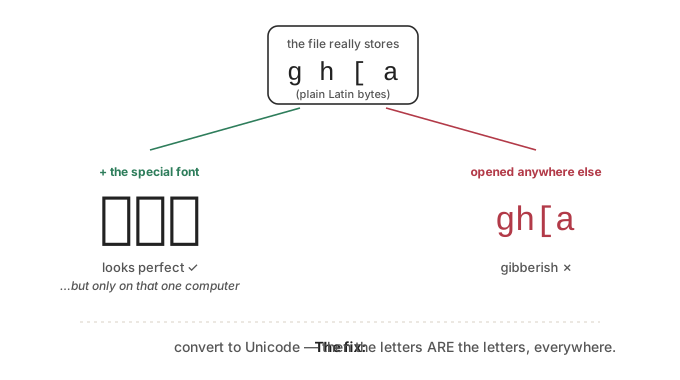
The catch is in the picture above. The letters are Latin in a costume. Take the file to any other computer — one that doesn't have that exact font — and the costume comes off: you see the real gh[a underneath. The "Devanagari" was a magic trick that only worked in one room.
These are called legacy fonts (Sanskrit99, various "Itranslator" and "Shusha" families, and many others). Millions of important documents are trapped inside them.
Why you can't just "change the font"
The instinct is to slap a proper Unicode font on the gibberish and hope it turns back into Devanagari. It won't — because the underlying data really is gh[a, and a normal font will just draw those letters. The costume, not the body, was the Devanagari.
What you actually need is to convert the text to Unicode — the modern, universal system in which every letter in every script has its own number, so a letter is the letter it means, independent of any font. Once your text is real Unicode, it looks right everywhere, forever, in any font that has the script.
Why the conversion is two jobs, not one
Converting isn't a simple find-and-replace, because two things about legacy fonts fight you:
1. Joined letters were stored as single shapes. In Devanagari, letters merge into conjuncts (क् + ष become क्ष). The old font often had one key for that whole merged shape. So one legacy character has to become several Unicode characters — a one-to-many swap.
2. The letters were stored in the order they're drawn, not the order they're meant. This is the subtle one. In Devanagari, the short-i vowel sign is drawn to the left of its consonant but belongs after it in Unicode. A little "r" hook (the reph) is drawn on top of a later letter. Old fonts stored what the eye sees, left to right. Unicode stores what the word means. So after you swap the shapes, you must reorder these marks into their logical positions — or the text will be subtly, stubbornly wrong.
⚙️ For the hands-on reader
- Build an ordered list of
(legacy-code → unicode)pairs and apply the longest matches first, so multi-character conjuncts are caught before their pieces.- Then run a reordering pass: find "pre-posed vowel sign + consonant" and swap them; move the reph to its logical spot; normalize visarga/anusvāra order.
- Test against a known sample every time (
g[ezay nm>must reliably becomeगणेशाय नमः).- You rarely have to invent the mapping from scratch — published tables exist for the common legacy fonts. Start from one and adjust.
The good news
This sounds daunting, but it's a one-time hurdle. Once your text is real Unicode, the disguise is gone for good: it will open correctly on any computer, in any font, on any phone, in any ebook — for the rest of its life. Everything else in this series depends on getting past this gate first, so it's worth doing carefully and confirming with a few known phrases before you trust the whole document.
How we solved it on the engagement
Rather than retype thousands of syllables by hand, we built a small custom converter for the client's legacy font. It was an ordered mapping that turned each old glyph into its true Unicode character or sequence of characters — longest matches first, so conjuncts resolved before their pieces — followed by a reordering pass that moved pre-posed vowel signs and the reph into logical order. We validated it against a set of known phrases (a line that had to come out as गणेशाय नमः every single time) before trusting it on the full manuscript. What could have been weeks of error-prone transcription became one repeatable, checkable step — and, just as importantly, a step we could re-run cleanly if the source was ever revised.
Takeaways
- If old "Devanagari/Tamil" turns to Latin gibberish when copied, it's a legacy font — the text is Latin letters in disguise.
- You can't fix it by changing the font; you must convert it to Unicode.
- Conversion is two jobs: swap the shapes to real characters, and reorder the marks into logical order.
- Test against a known sample before trusting the whole file.
- Once done, it's done forever — the text is now portable everywhere.