Little dotted circles appear between the letters of your Devanagari or Tamil text. They look like corruption. They're actually the text politely telling you exactly what's wrong. This is the most famous small mystery in Indic typesetting, and it's simpler than it looks.
New here? This is one article in a Gurugo Labs field series drawn from a client engagement to produce a traditional trilingual (Sanskrit · Tamil · English) devotional book — but it reads on its own. This article: what those mysterious dotted circles in Indian-language text mean, and how to clear them. One word you'll need: a combining mark is a small sign that can't stand alone and must sit on a letter — a vowel sign, a dot, an accent.
The scene
Partway through preparing the client's text, they appeared: tiny circles across a passage of Devanagari or Tamil, some with a mark clinging to them, scattered between letters — ◌ि, ◌्, ◌ॗ. They hadn't been there before, or they turned up right after the text was copied, wrapped, or converted. Had something broken?
No. This is the dotted circle, and once you understand it, it never confuses you again.
What a dotted circle actually is
A combining mark is one of the little signs that can't stand on its own: a vowel sign, the dot of an anusvāra, a Vedic pitch accent. Each one is like the two dots over ü — meaningless floating in space, meaningful sitting on a letter.
So what does a font do when it's handed one of these marks with no letter to attach it to? It can't just draw a mark in mid-air — that would be invisible or nonsensical. Instead, it draws the mark sitting on a little dotted placeholder circle, as if to say: "This mark is homeless. It's supposed to be on a letter, but there isn't one here."
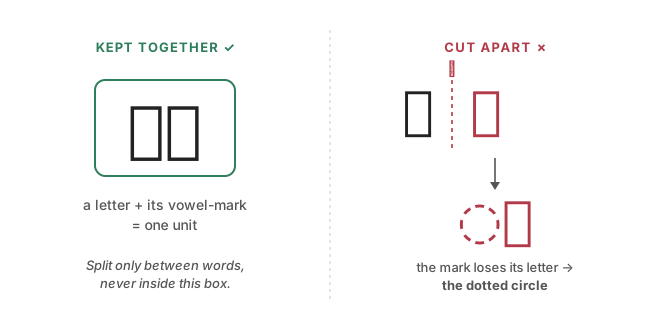
That's the whole mystery. A dotted circle is a combining mark that lost its letter. It isn't corruption — it's an honest error message drawn right into your text.
How a mark loses its letter
There are only two ways it happens.
1. A stray mark survived the conversion. Occasionally the font-to-Unicode step leaves an extra, unattached mark behind. Rare, and easy to spot and delete.
2. The text got cut in the wrong place. This is the real culprit, and it's worth understanding deeply, because it will bite you again and again.
Here's the key idea. A letter and all its attached marks form a single unit — call it a letter wearing a hat. In Devanagari, कि is not two things ("क" and "ि"); it's one thing, a letter with a vowel-hat. The technical name is a grapheme cluster.
Now imagine something splits your text — a line wrap, a copy-paste, a program breaking text into pieces — and the split lands inside one of these units, between the letter and its hat. The letter goes one way; the hat goes the other. And the stranded hat, with no head to sit on, draws itself on a dotted circle. That's the circle at the start of a wrapped line, the circle after a bad copy-paste, the circle your script produced when it chopped text every N characters.
The one rule that prevents all of it
Never cut text in the middle of a grapheme cluster. Split only at the spaces between words.
Words are safe places to break; the insides of letters are not. Every circle you'll ever see traces back to a break that ignored this rule.
This matters doubly for a Vedic text, because the pitch accents are combining marks too. Respect the clusters and you protect the accents automatically; ignore them and you'll strand a svara on a circle just as easily as a vowel sign.
Why no font setting will fix it
The tempting mistake is to treat a circle as a display problem — to try a different font, or fiddle with settings, hoping the circle goes away. It won't, because the circle isn't about how the text looks; it's about what the text contains. There's a homeless mark sitting in your data. The only fix is to fix the text: delete the stray mark, or rejoin it to the letter it belongs with — and, going forward, stop splitting inside clusters.
How we solved it on the engagement
On the engagement the circles came from exactly the two sources above: a handful of stray marks left behind by the initial font conversion, and text split at the wrong boundary during processing. We cleared the strays in the same quality pass that normalized the Unicode, and we made our text-handling cluster-aware, so a split only ever fell between words and never inside a letter-and-its-marks. Because the Vedic accents are combining marks too, that one discipline protected the pitch accents at the same time. After that, the circles didn't come back.
⚙️ For the hands-on reader
- A lone combining mark at the very start of a line is the tell-tale of a mid-cluster split. Search for one to find the source.
- When your code splits or wraps text, split on whitespace/word boundaries, never on a fixed character count — that count will eventually land mid-cluster.
- If you must process text character by character, use a library that understands grapheme clusters (extended grapheme boundaries), not raw code points.
Takeaways
- A dotted circle ( ◌ ) is a combining mark that lost its letter — an error message, not corruption.
- Marks get orphaned by a stray leftover or, usually, a split in the wrong place.
- A letter plus its marks is one unit (a grapheme cluster) — never cut inside it.
- Split text only at spaces between words. This also protects Vedic accents.
- A circle is a text problem, never a font one — no setting fixes it.