You didn't touch the file. You went to lunch. You came back and now your search doesn't match, or your script throws errors it never threw before. Nothing you did caused it — the cloud quietly rewrote your text while you weren't looking. Here's the invisible mechanism, and how to make your work immune.
New here? This is one article in a Gurugo Labs field series drawn from a client engagement to produce a traditional trilingual (Sanskrit · Tamil · English) devotional book — but it reads on its own. This article: why text with accents or marks — most Sanskrit and Tamil — can quietly change in cloud-synced folders and break your searches and scripts. One idea you'll need: Unicode is the modern system where every letter has its own number; the wrinkle below is that some letters have two legitimate numbers for the same shape.
The most disorienting bug on the engagement
This one felt like the file had turned on us. It was perfect. We saved it, closed the laptop, and the next time we opened it, a find-and-replace stopped matching a word that was right there on the screen — and a small script that had run fine the day before now failed on the same text.
You'll doubt your sanity before you doubt the file. Don't. There's a real, understandable cause — and once you know it, it loses all its power to spook you.
The secret: some letters have two spellings
Here's the fact that explains it. In Unicode, certain accented and marked letters can be stored in two different ways that look exactly the same on screen.
Take the letter é. It can be stored as:
- one character — a single "e-with-acute-accent" (this is called the composed form), or
- two characters — a plain "e" followed by a separate "combining acute accent" that stacks on top (the decomposed form).
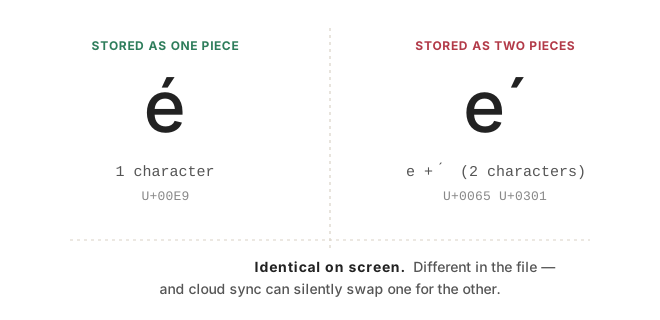
Both draw the identical é. Your eyes can't tell them apart. But inside the file they are different data — one item versus two — and to a computer doing an exact comparison, they are as different as "cat" and "dog." (The technical names are normalization forms: NFC for composed, NFD for decomposed.)
This matters enormously for Sanskrit and Tamil, which are full of base-letter-plus-mark combinations. A huge share of the text can exist in either spelling.
How the cloud triggers it
Now the culprit. Some file-syncing and storage systems have a house style for which spelling they prefer, and they will silently rewrite your text into that form as it passes through — often when syncing filenames and file contents to and from the cloud. (Apple's file system and several sync services are well known for preferring the decomposed two-piece form.)
So the sequence is: you type or paste text in the composed one-piece form. You save it to a synced folder. The sync service quietly re-spells every é (and every marked Sanskrit/Tamil letter) into the two-piece form. You reopen the file — it looks identical, because it is, to the eye. But now:
- your search for the one-piece spelling finds nothing, because the file holds the two-piece spelling;
- a script that matched exact characters breaks, because the characters it was written against silently changed underneath it;
- two files you'd expect to be identical no longer compare as equal.
Nothing was corrupted. The text was re-spelled into an equivalent form, and anything relying on the exact original spelling tripped over the difference.
How to make your work immune
The cure is a single idea: normalize on purpose, so the computer isn't doing it behind your back. Pick one spelling — composed (NFC) is the usual, safest choice — and deliberately convert your text to it at the moments that matter: when you first import text, and right before you search, compare, or run any script over it. Once everything is in one known form, the "same letter, two spellings" ambiguity disappears and the ghost bug can't return.
⚙️ For the hands-on reader
- Run a normalization pass (to NFC) as the first step of any script that processes the text, and after any round-trip through a synced folder.
- When a search or regex mysteriously fails on text that's visibly present, suspect normalization first — compare the raw code points of the on-screen text against your search string.
- If a script is stored in a synced folder, the script's own source can be silently re-spelled too. Building match-patterns from explicit code points (rather than pasted literal characters) sidesteps it.
- Keep an eye on filenames, not just contents — sync services normalize those as well, which can break exact-name file lookups.
How we solved it on the engagement
Once we traced the vanishing matches to normalization, we made it a non-issue by settling on one form for the entire project. Every piece of text entering our pipeline was normalized to NFC, and each processing script re-normalized its input as its very first step — so nothing downstream ever depended on how a synced folder happened to spell a letter that day. We also built our search-and-fix patterns from explicit code points rather than pasted characters, which kept the scripts themselves immune when their own source files round-tripped through the cloud. After that, the ghost bug simply stopped occurring.
Takeaways
- A marked letter like é (or most Sanskrit/Tamil letters) can be stored two ways that look identical — one piece or two.
- Cloud sync can silently re-spell your text from one form to the other — no corruption, just a different equivalent form.
- The symptom is spooky: searches stop matching, scripts break, identical files differ — with no edit on your part.
- The fix is to normalize on purpose (pick NFC) when you import, and before you search, compare, or process.
- When a match fails on text you can plainly see, suspect normalization first.