The words are right. From here on, the work is not about what the text says but about how it sits on the page. And that work is very hard to do in a word processor, because a word processor was built for a different job. This article is about the tool you move to, and — more importantly — the change in thinking that comes with it.
New here? This is one article in a Gurugo Labs field series drawn from a client engagement to produce a traditional trilingual (Sanskrit · Tamil · English) devotional book — but it reads on its own. This article: why finished-looking books are laid out in dedicated software rather than a word processor, and how the two tools make you think differently. One term you'll need: layout software is a program built specifically for arranging text and images on pages with precise control (the free standard is Scribus).
Two tools, two mental models
A word processor and layout software can both put words on a page, so it's tempting to think they're the same tool with different price tags. They aren't. They hold a fundamentally different idea of what a document is.
A word processor treats your document as one continuous stream of text — a single river that flows from the first page to the last. You type at the end, and the river gets longer. This is perfect for the thing it was designed for: writing. When you're drafting a letter or a report, you want to just keep typing and let the pages take care of themselves.
Layout software treats a page as a canvas of independent frames that you position deliberately: a frame for this block of text here, another for that one beside it, a frame for an image there, a heading across the top. Nothing "flows" unless you decide it should. You are not typing a document; you are arranging one.
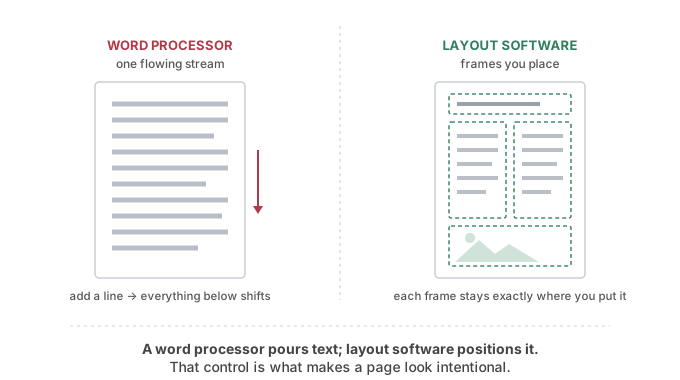
That picture is the whole idea in one image. On the left, text is a stream. On the right, text is a set of things you place.
Why the difference matters so much for a book
The stream model has a consequence you've certainly felt: in a word processor, inserting something makes everything after it move. Add a paragraph on page 3 and page 40 shifts. Nudge one image and the text reflows around it in ways you didn't ask for. For writing, that automatic reflow is a feature. For designing a book — where you've carefully decided that this verse sits at the top of a right-hand page facing its translation — it is a constant, low-grade fight against the tool.
Layout software removes the fight by making placement deliberate and stable. A frame stays exactly where you put it. Text flows only through the frames you connect, in the order you choose. This is what lets a book have:
- facing pages designed as a pair — the Sanskrit on the left, the transliteration on the right, aligned on purpose;
- master pages — a template applied to many pages at once, so a running header or page number appears everywhere and can be changed everywhere from one place;
- real typographic control — exact margins, precise spacing, fine control over how each script sits.
None of these is comfortable in a word processor, and all of them are the everyday substance of book design.
What you give up, and what you must bring
Moving to layout software costs two things, and it's honest to name them.
First, a learning curve. You are learning a new mental model — frames, not typing — and at the start it feels slower. It pays back quickly, but the first hour is humbling.
Second, and more importantly: layout is not where you write. Because the tool is built for arranging finished content, you want your text to be essentially final and verified before it flows in. This is exactly why the whole first half of this series was about getting the text right first. You bring corrected, proofread, transliterated text to the layout stage; you don't compose it there. Editing heavily inside the layout is how mistakes and inconsistencies creep back in.
How we solved it on the engagement
We laid the book out in Scribus — free, open-source, and fully capable of professional print work — rather than trying to force a word processor to behave like a book. That decision bought us the facing-page control the trilingual structure needed: each spread designed as a pair, with stable frames that didn't shift when a neighbouring page changed.
The detail worth borrowing is what we did with the repetition. A devotional book of this kind has hundreds of small, identical-in-shape layout jobs — section titles in three scripts, a table of contents, running headers that name the current section on every page. Placing those by hand is slow and, worse, a reliable source of inconsistency. Because Scribus is scriptable, we automated the repetitive layout tasks: generating the table of contents from the headings, producing the running headers, and laying out the trilingual section titles from a single source list. The layout became partly programmatic — which meant it was consistent by construction and could be regenerated cleanly whenever the content changed, exactly the same discipline we'd used for the text.
⚙️ For the hands-on reader
- The free, capable standard is Scribus (the commercial equivalent is Adobe InDesign). For a one-off book, Scribus is more than enough.
- Use paragraph and character styles, never manual one-off formatting. Define "verse", "heading", "transliteration" once; apply them everywhere; restyle globally by editing the style.
- Set up master pages early for anything that repeats (headers, folios), rather than placing them by hand.
- Keep the text in a source file and import it; treat the layout as presentation, so you can re-import cleanly if the text is revised.
- If the tool supports scripting, the repetitive, error-prone layout jobs (building a table of contents, placing hundreds of section titles, generating running headers) are exactly the things worth automating.
Takeaways
- A word processor models a document as one flowing stream; layout software models a page as independent frames you place.
- The stream model makes everything reflow when you change something — fine for writing, a fight when designing a book.
- Layout software gives stable placement, facing pages, master pages, and real typographic control.
- Bring finished, verified text to the layout stage; it is for arranging, not composing.
- Repetitive layout jobs are worth automating where the tool allows — consistency by construction.