Every other article in this series explained one problem in depth. This is the fast lookup: a symptom you can see, the cause behind it, and the fix — grouped by stage, so when something looks wrong you can name it in seconds.
New here? This is the reference article in a Gurugo Labs field series drawn from a client engagement to produce a traditional trilingual (Sanskrit · Tamil · English) devotional book. Every entry below is a problem we actually met on that engagement, distilled to a symptom, its cause, and its fix.
How to use this index
Most problems in multilingual book-making announce themselves visually — boxes, circles, gibberish, a colour that came out wrong. The single most useful skill is learning to read the glitch: each visible symptom points to a specific cause, and each cause has a known fix.
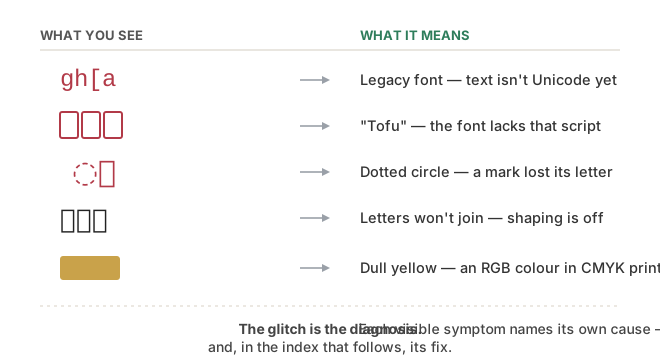
Find your symptom in the tables below. The Cause column tells you what's actually happening; the Fix column tells you what to do — and each section links out to the article with the full story.
1. Text and encoding
Full articles: Rescuing font-locked text · The mystery of the circles · When your file breaks itself.
| Symptom | Likely cause | Fix |
|---|---|---|
Devanagari/Tamil turns into Latin gibberish (gh[a) when copied to another program |
The text is in a legacy (non-Unicode) font — Latin bytes disguised by a special font | Convert the text to Unicode (map glyphs and reorder marks); verify against a known phrase |
| A conjunct or vowel sign sits in the wrong place after conversion | The reordering pass wasn't applied — legacy fonts store draw-order, not logical order | Run the reorder step (pre-posed vowel signs, reph); re-test a known sample |
| Search/replace finds nothing on text that's visibly present | Normalization mismatch (NFC vs NFD) — same letter, two encodings | Normalize everything to NFC on import and before searching |
| A script that ran yesterday breaks today, untouched; or two "identical" files differ | A synced folder silently re-normalized the text | Normalize to NFC at each script's first step; build patterns from code points |
2. Fonts and rendering
Full articles: The font problem in layout · The mystery of the circles · Proofreading a sacred text.
| Symptom | Likely cause | Fix |
|---|---|---|
| Empty boxes (☐, "tofu") where a script should be | The font doesn't contain that script | Use a script-complete font (e.g. Noto Serif Devanagari / Tamil) |
| Letters appear but don't join into conjuncts; the halant stroke shows | Shaping is missing or outdated in the software | Use a complex-script-capable version (a current Scribus build); test क्ष first |
| On a mixed line, one script looks wrong while the other is fine | One font applied to multiple scripts | Assign fonts per script via character styles |
| A dotted circle (◌) appears between letters | A combining mark lost its base letter — a stray mark or a mid-cluster split | Remove the stray / rejoin it; never split inside a grapheme cluster |
| An accent is missing or on the wrong syllable | Dropped in conversion or an editing slip | Proofread in a dedicated accent pass; verify against the source and an authority |
| A chosen font won't embed in the PDF/ebook | The font's licence forbids embedding | Use an OFL-licensed font (the Noto family permits embedding) |
3. Layout and pages
Full articles: From word processor to layout software · Two languages side by side · The pages before the book.
| Symptom | Likely cause | Fix |
|---|---|---|
| Inserting one line makes everything after it shift | The word-processor stream model | Use layout software with stable, positioned frames |
| Facing pages drift out of alignment down the spread | Scripts occupy different space, so two streams fall out of step | Align by passage on a grid; fix structure on master pages |
| A left page's running header names the wrong section | The header follows the left page's own text, not its facing page | Make the verso header name the section on its facing recto |
| Table-of-contents page numbers are wrong after edits | The TOC was typed by hand | Generate the TOC from headings; regenerate after any layout change |
| An unavoidable blank page looks like a mistake | The recto/verso rules force it | Fill it deliberately — an ornament, an invocation, a note |
4. Cover and print
Full article: Designing a print cover.
| Symptom | Likely cause | Fix |
|---|---|---|
| A bright yellow (or other vivid colour) prints dull / golden | An RGB colour a CMYK press can't reproduce | Design in CMYK; set the colour as a process value; verify before printing |
| A thin white sliver along a cover edge | No bleed — artwork stopped exactly at the trim | Extend edge artwork a few mm past the trim into the bleed |
| Front artwork creeps onto the spine or back | Spine width is wrong | Size the spine to page count × paper thickness (ask the printer) |
| The cover PDF is enormous (hundreds of MB) | Oversized raster images embedded far above print need | Downsample rasters to ~300 DPI at placed size; set export DPI; prefer vector |
| A printed image looks fuzzy | Resolution below ~300 DPI at placed size | Use a higher-resolution raster, or vector artwork |
The one habit behind all of these
Notice the pattern across every row: the fix is almost never "try a different font and hope." It's to understand what layer the problem lives in — the text's encoding, the font's coverage, the software's shaping, the page's structure, the press's colour — and to act on that layer. A boxed letter is a font problem; a circle is a text problem; a dull colour is a colour-space problem. Name the layer and the fix follows.
That habit — reading the glitch, then acting on the right layer — is what turned a wall of mysterious errors on the engagement into a short, calm checklist. It is the whole craft in miniature.